Brother XM2701 Sewing Machine Review: Worth It? (October 2026)
The Brother XM2701 suits beginners and everyday home sewing, with useful feet for hems, zippers and buttons, plus threading aids. Choose it for varied clothing repairs and small projects; compare other options for frequent bulky seams or large quilts.
On this page (8 sections)
- What does the Brother XM2701 offer?
- Which projects are a good match?
- How should you set up the XM2701?
- How do you get better hems, zippers and buttonholes?
- How does the XM2701 compare with these alternatives?
- What should you check before buying?
- How do you prevent common sewing problems?
- Should you choose the Brother XM2701?
The Brother XM2701 is a good fit for beginners and home sewers who want to mend clothes, alter hems and learn basic garment work. Its included specialty feet give you room to move beyond straight seams without choosing a machine around decorative stitches alone.
Buy it for the projects you expect to make most often. Frequent bulky seams, large quilts and sewing outside its intended electrical market call for a closer comparison before you commit.
What does the Brother XM2701 offer?
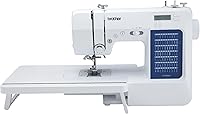
The XM2701 gives you 27 built-in stitches and 6 sewing feet for a varied home sewing routine. Those stitches include decorative, blind hem, zigzag and stretch options, plus a one-step auto-size buttonhole.
Brother XM2701

- 27 built-in stitches
- Automatic needle threader
- Drop-in top bobbin
- 6 sewing feet
- Free arm
A practical choice for learning garment repairs and moving on to zippers, buttonholes and different hem finishes. The included feet cover several common home sewing tasks.
Pros
- Feet for zippers, hems, buttonholes and buttons
- One-step auto-size buttonhole
- Automatic needle threader and drop-in top bobbin
- Free arm for cuffs and pant legs
Cons
- Intended for US use at 120 volts
- Fewer built-in stitches than the XM3700 and GX37
The feet cover buttonholes, zippers, zigzag stitching, narrow hems, blind stitching and sewing buttons. That selection matters if your plans include replacing a zipper, shortening clothing or finishing a lightweight edge.
An automatic needle threader helps pass thread through the needle eye, while the top drop-in bobbin makes bobbin placement accessible. Brother describes the bobbin system as jam-resistant, but correct threading and suitable supplies still matter.
The free arm helps you position tubular pieces such as cuffs and pant legs. It doesn't remove the need to keep the underside of the garment clear of the needle.
Who should buy the Brother XM2701?
Choose the XM2701 if you want one machine for several ordinary sewing jobs and are willing to learn what each foot does. It suits a beginner whose plans extend from repairing an open seam to making simple clothing or small fabric projects.
It also makes sense for a returning sewer who wants familiar sewing tasks covered in one accessory set. You don't need to use every stitch for the machine to be useful.
Skip it if frequent dense seams or large quilting projects are your main reason for buying. Those jobs put more weight on fabric handling, working space and suitable accessories than on the number of stitch patterns.
Which projects are a good match?
The XM2701 suits mending, alterations and small sewing projects where you can guide the fabric comfortably. Think simple woven garments, fabric bags, cushion covers and clothing repairs, with the needle and settings matched to the material.
For a loose hem, decide whether you want visible stitching or a less visible finish before choosing a foot. A blind hem needs accurate folding, while a narrow rolled edge takes practice feeding the fold evenly.
Stretch fabric needs a different approach from stable woven cotton. Choose a suitable needle and stitch, then check that the seam can stretch without the thread breaking.
Don't pull stretchy fabric through the machine to make it move faster. Let the feed mechanism move it while your hands guide the edge, since pulling can leave a wavy seam.
For jeans, the hardest point is often a folded seam crossing rather than a flat piece of denim. Read our guide to sewing denim and jeans on a home machine before planning repeated work through thick intersections.
Small patchwork projects and managing a full quilt are different tasks. If quilts are your priority, compare working room and fabric support in our best sewing machines for quilting guide.
How should you set up the XM2701?
Start with correct threading, a suitable needle and a scrap of your project fabric. Threading aids save effort, but they don't choose the needle, thread or stitch for you.
Place the machine on a firm table with room for fabric on both sides. Keep the foot control where your leg can reach it comfortably, and avoid letting a heavy project hang off the table.
Use the manual for the exact threading route, bobbin type and bobbin insertion direction. Raise the presser foot when threading the upper path so the thread can enter the tension system properly.
Install a needle suited to the fabric and check that it is fully seated in the correct direction. Use the manual's needle and thread guidance rather than assuming the needle already fitted is right for every project.
Before sewing clothing, work through this short routine:
- Fit the correct foot for the task.
- Thread the machine and insert the bobbin as directed.
- Select the stitch and any settings the manual requires.
- Sew on scraps with the same number of layers as the project.
- Check the top and underside of the seam before continuing.
For a first project, choose a stable woven fabric and a straight seam. Save slippery fabric, stretchy knits and bulky corners until you can start, guide and stop a seam comfortably.
If you're still deciding which control style you prefer, read what a computerized sewing machine is. Compare how you want to select stitches and manage settings, rather than assuming more controls will make learning easier.
How do you get better hems, zippers and buttonholes?
The best improvement comes from preparing the fabric and practicing the operation before the final seam. A specialty foot guides part of the task, but it can't correct an uneven fold or misplaced opening.
For hems, press the fold first and check the finished length while the garment hangs naturally. Mark the full hem before trimming, especially if the original edge is uneven.
A narrow hem foot needs a consistent amount of fabric entering its guide. Practice on a straight scrap edge before trying curves or a fabric that frays easily.
For zippers, baste or otherwise secure the zipper in position before sewing. Keep the teeth and slider clear of the needle path, following the foot instructions for each side.
Make a sample buttonhole using the same fabric layers and interfacing as the garment. Check that the actual button passes through before cutting the opening in your finished piece.
When using the free arm, arrange the garment so only the intended layer sits under the foot. Pause to check underneath as you rotate a sleeve or pant leg.
How does the XM2701 compare with these alternatives?
The XM2701 is the balanced choice for mixed home sewing, while the alternatives serve more specific preferences. Choose between them by the work you'll do and the controls you want to use.
| Machine | Built-in stitches | Included feet | Buttonhole |
|---|---|---|---|
| Brother XM2701 | 27 | 6 | One-step auto-size |
| Brother XM3700 | 37 | 5 | One-step auto-size |
| Brother GX37 | 37 | 6 | One-step auto-size |
| Singer M1500 | 6, with 57 applications | 3 | Four-step |
Brother XM3700: for learning more garment details
Choose the XM3700 if you expect to explore decorative stitching and garment details beyond basic repairs. Its 37 built-in stitches give you more patterns to work with, and its accessory storage helps keep small items together.
The included feet cover common garment tasks, including zippers, blind stitching and buttons. A built-in LED light illuminates the work area, and the removable storage compartment exposes the free arm.
Skip it as an upgrade if you can't name a stitch or feature you'd use beyond those on the XM2701. More patterns don't improve a straight seam by themselves.
The XM3700 doesn't include a narrow hemmer among its supplied feet. If rolled hems are central to your plans, factor that difference into your choice.
Brother GX37: for learners who want a visible stitch reference
Choose the GX37 if stitch patterns printed on the machine would help you connect a stitch's shape with its use. Selection uses a dial, so the visible chart is a practical reference while learning.
It offers 37 built-in stitches and includes a narrow hem foot among its accessories. A soft dust cover is also included for storage between projects.
Skip it if the printed reference and extra patterns don't solve a need you have. Its broader stitch menu alone isn't a reason to replace an XM2701 that already covers your projects.
The useful comparison is which machine gives you the stitch choices and accessories you'll reach for regularly.
Singer M1500: for occasional repairs with fewer setting choices
Choose the M1500 if you want preset stitch length and width for occasional mending and simple projects. Those presets reduce the choices you need to make before sewing.
Its 6 built-in stitches provide 57 stitch applications, which means different uses of those stitches. That application count isn't directly comparable with the Brother machines' built-in stitch totals.
Skip it if you want to adjust stitch length and width for different seam effects. Its four-step buttonhole also requires more input than the one-step approach on these Brother models.
The supplied all-purpose, zipper and buttonhole feet cover a smaller starting set of tasks. For a wider look at the brands, read Brother vs Singer sewing machines, or browse our best Brother sewing machines.
What should you check before buying?
Check electrical compatibility, project demands and storage space before choosing the XM2701. Those practical limits matter more than a stitch pattern you might use once.
Brother intends this model for sale in the US at 120 volts and warns that other use or sale may void the warranty. Confirm the applicable coverage with Brother, especially if you're buying across borders.
The machine weighs 12.6 pounds. If you'll put it away after each session, consider the lift from your storage shelf to the table as well as the room needed for fabric.
Don't treat a metal material description as proof that a machine suits repeated heavy work. Match the fabric, layer count and needle requirements to the manual before starting a demanding project.
Brother offers free technical support online, through live chat and by phone for the life of the machine. Keep the manual accessible so you can follow its setup steps when asking for help.
How do you prevent common sewing problems?
Prevent many avoidable problems by checking threading and the needle before changing tension. Random adjustments can make it harder to find the original cause.
If thread bunches underneath, stop and rethread the upper path with the presser foot raised. Then check bobbin placement and try another seam on scrap fabric.
A jam-resistant bobbin system still needs the right bobbin, correct insertion and a clean area around it. Don't force the fabric or keep pressing the foot control when the machine stalls.
For a tangle, switch off the machine and follow the manual's removal steps. Our guide to why a sewing machine keeps jamming gives you a more detailed troubleshooting order.
If stitches look uneven, inspect the needle for damage and confirm that the thread suits the fabric. Work through sewing machine tension problems before moving the tension control repeatedly.
Remove lint from accessible areas as the manual directs, with the machine unplugged. Oil only where and when the manual calls for it, and avoid forcing tools into covered parts.
Replace a bent, blunt or damaged needle promptly. Cover the machine between sessions and store the feet together so the right accessory is ready for the next job.
Should you choose the Brother XM2701?
Choose the Brother XM2701 for a mix of repairs, hems and beginner garment projects. It makes the most sense when you'll use its specialty feet and want to learn several common sewing tasks.
Pick the XM3700 for garment work that benefits from its extra stitch choices, or the GX37 if a printed stitch reference suits how you learn. Choose the Singer M1500 when preset settings fit your occasional repairs.
If frequent bulky seams or large quilts dominate your plans, compare machines around those jobs first. Use our sewing machine buying guide to turn your next few projects into a clear shortlist.
Frequently asked questions
Is the Brother XM2701 good for beginners?
Yes, the Brother XM2701 suits beginners who want to learn repairs, hems and basic garment sewing. Its threading aids simplify part of setup, while the included feet support several tasks.
Start with straight seams on stable woven fabric, then learn each specialty foot on scraps before using it on clothing.
What stitches does the Brother XM2701 have?
The Brother XM2701 has 27 built-in stitches, including decorative, blind hem, zigzag and stretch stitches, plus a one-step auto-size buttonhole. Choose by the seam you need rather than the stitch total.
Straight seams, edge finishing and stretch seams require different settings, needles and fabric handling.
What comes with the Brother XM2701?
The Brother XM2701 includes 6 sewing feet, a needle set, a twin needle, bobbins, an accessory bag, a screwdriver, an extra spool pin, a darning plate, a power cord and a manual. The feet cover zigzag stitching, zippers, blind stitching, narrow hems, buttonholes and sewing buttons.
Can the Brother XM2701 be used outside the US?
The Brother XM2701 is intended for sale in the US at 120 volts. Brother warns that other use or sale may void the warranty.
Before buying for another country, ask Brother about local electrical compatibility and coverage; a plug adapter alone does not change the supply voltage.