Brother CS7000X Computerized Sewing Machine Review: Worth It? (October 2026)
The Brother CS7000X suits home sewers who want to make garments, handle repairs and start quilting with one computerized machine. Choose the XR9550 or HC1850 instead if built-in lettering is a priority.
On this page (10 sections)
- What makes the Brother CS7000X worth considering?
- Which Brother alternative fits your projects better?
- Are the CS7000X's stitches enough for everyday sewing?
- How much quilting can you reasonably plan?
- Can the CS7000X handle denim and thick seams?
- How should you set up the CS7000X for the first project?
- What should you check about power, storage and classes?
- Which mistakes cause avoidable sewing problems?
- How do you care for the machine between projects?
- Should you choose the Brother CS7000X?
The Brother CS7000X is a good choice for home sewers who want one machine for garments, repairs and quilting. Its appeal is the combination of useful accessories and room to handle fabric, rather than the largest stitch menu.
Choose it if your next projects include cushion covers, clothing, quilt blocks or similar home sewing. Look at the alternatives below if built-in lettering or a particular quilting feature would change what you can make.
What makes the Brother CS7000X worth considering?
The CS7000X gives you a useful mix of stitches and sewing accessories for moving between everyday sewing and quilting. It has 70 built-in stitches across utility, decorative, heirloom and quilting functions, plus 7 one-step auto-size buttonhole styles.
Brother CS7000X
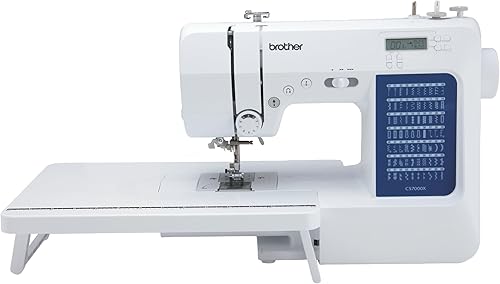
- 70 built-in stitches
- 7 one-step auto-size buttonholes
- 10 sewing feet plus quilt guide
- Wide table and hard case
Choose the CS7000X for a mix of garment sewing and quilting. Its included feet and fabric support make it a useful starting point for several kinds of home projects.
Pros
- Wide table supports fabric beside the needle
- 10 sewing feet and a quilt guide included
- Automatic needle threader and top drop-in bobbin
- Free arm for cuffs and other narrow projects
Cons
- Choose an alphanumeric alternative for built-in lettering
- US sale and 120-volt requirements limit suitability abroad
The included wide table supports fabric beside the needle, while the larger needle-to-arm workspace gives you room to arrange bulk on the other side. These solve different problems: surface support keeps fabric from hanging, and arm space helps you position the project.
Its metal frame and fixed needle bar are also worth considering. Brother says the fixed needle bar helps produce cleaner stitching and even lines, though fabric handling and needle choice still matter.
The accessory bundle includes 10 sewing feet and a quilt guide. Learn which foot matches each task before adding more accessories, since the right foot can matter more than another decorative stitch.
Who should buy the Brother CS7000X, and who should skip it?
Buy the CS7000X if you want to learn several kinds of sewing without choosing a machine around one narrow task. It suits a beginner planning to progress from simple seams to garments or quilt projects.
Skip it if your main goal is built-in lettering, large embroidered designs or repeated work through very thick seams. The alternatives here address lettering, but sewing letters with built-in stitches is different from making hoop-based embroidery designs.
If you only need occasional repairs, decide whether you'll use the quilting accessories. Our best sewing machines for beginners guide can help you compare machines around the work you'll actually do.
Which Brother alternative fits your projects better?
Choose the XR9550 or HC1850 for built-in lettering, and consider the CP100X for its named quilting feet and adjustable speed. A larger stitch total is useful only when it adds patterns or functions you want.
| Machine | Main reason to choose it | Who should skip it |
|---|---|---|
| Brother CS7000X | A mix of everyday sewing and quilting | Sewers who need built-in lettering |
| Brother XR9550 | Letters, numbers and free-motion work | Sewers who won't use the added stitch choices |
| Brother HC1850 | Decorative sewing, basic monogramming and quilting | Sewers focused only on repairs and plain seams |
| Brother CP100X | Quilting accessories and adjustable sewing speed | Anyone expecting monogramming |
The XR9550 suits someone who wants to add letters or numbers to sewn projects. Its drop feed also supports free-motion quilting, where you guide the fabric to form the pattern.
Skip it if personalization has no place in your plans. For the closer choice between these two models, read Brother CS7000X vs XR9550.
The HC1850 suits decorative quilting and basic monogramming, with a stitch reference flip-chart, adjustable sewing speed and a spring-action quilting foot. Those features give it a clearer purpose than simply having the biggest stitch count here.
Skip it if most of your sewing is straight seams, hems and repairs. You won't gain much from a broader pattern menu if those stitches remain unused.
The CP100X suits sewers who want a walking foot, quarter-inch piecing foot and quilting foot included. Adjustable speed is another reason to compare it if you want control while learning a new seam or technique.
Skip it if you want monogramming. Brother specifies that its monogramming foot is for decorative stitches and that the machine cannot monogram.
Are the CS7000X's stitches enough for everyday sewing?
The stitch types matter more than the total for repairs, clothing and basic quilting. Straight seams, stretch-friendly seams, edge finishes and buttonholes have clear jobs; decorative patterns are optional unless your projects call for them.
Write down your next 3 projects before comparing stitch menus. A woven skirt, a knit top and a patchwork cushion each place different demands on the needle, seam and fabric handling.
For buttonholes, practice on scraps with the same fabric layers and interfacing as the garment. Check the opening against the actual button before cutting, since a good-looking sample still needs to function as a closure.
The LCD display helps you see your stitch choice, but you still need to understand what that stitch does. Our explanation of what a computerized sewing machine is covers how electronic stitch controls differ from mechanical controls.
How much quilting can you reasonably plan?
The CS7000X suits quilt piecing and home quilting projects you can comfortably guide through its workspace. Start with a table runner, cushion panel or small quilt before committing to a bulky bed quilt.
A wide table doesn't increase the opening under the machine's arm. Before starting a larger project, fold or roll the excess fabric and check that you can move the area being sewn without pulling against the needle.
Keep the rest of the quilt supported on your work surface. Fabric hanging over an edge can tug on the seam, even when the section directly beneath the presser foot looks flat.
For layered work, learn how different quilting feet guide fabric before choosing a method. Our walking foot guide explains when that accessory helps move layers together.
Accuracy starts during cutting and piecing. Use a consistent seam allowance, press as you go and check that blocks remain the intended size before joining them into a larger top.
Can the CS7000X handle denim and thick seams?
Treat the CS7000X as a home sewing and quilting machine, and judge thick projects by their hardest seam. A few flat layers and a folded intersection place very different loads on a needle.
A metal frame doesn't establish how many layers you can sew. Dense fabric, seam bulk, needle size and thread choice all affect whether a project is suitable.
Practice the thickest part of the planned seam on matching scraps, following the manual's fabric and needle guidance. Don't push the fabric or force the machine through a spot where it struggles to advance.
If jeans hems or dense layers make up most of your work, compare machines around that need before choosing. Our guide to what makes a sewing machine heavy duty explains which details deserve closer attention.
How should you set up the CS7000X for the first project?
Start with correct threading and a simple seam on matching scraps before sewing the finished piece. The automatic needle threader and top drop-in bobbin simplify parts of setup, but the thread still needs to follow the correct path.
- Put the machine on a firm, level table with room for fabric in front, behind and beside it.
- Read the manual's setup steps and identify the presser foot, needle and bobbin required for the task.
- Switch off the machine before fitting or changing the needle or presser foot.
- Thread the upper path as directed, including the manual's presser-foot position, then load the bobbin in the correct direction.
- Sew a short sample with the same fabric, layers and thread as your project.
- Check both sides of the seam before changing settings or moving to the finished piece.
Start with a plain woven fabric rather than a slippery or stretchy material. That makes it easier to learn seam allowances, turning corners and stopping accurately without several fabric problems at once.
The smaller free arm is useful for cuffs and other narrow openings. Arrange the tube so you're sewing through only the intended layers, rather than accidentally closing the opening.
What should you check about power, storage and classes?
The CS7000X is a 120-volt machine intended for sale in the US. Other use or sale may void the warranty, so confirm suitability with Brother before buying it for another country.
It weighs 14 pounds and comes with a protective hard case. For classes, account for the machine, fabric, tools and accessories together when planning what you'll carry.
Measure your sewing surface with the detachable table in mind. Leave space to guide fabric behind the needle and somewhere nearby to put tools without crowding the seam path.
Store the machine unplugged and covered, with loose feet and needles organized separately. If you choose the XR9550 instead, keep the protective foam inside its hard cover in place as Brother directs.
Which mistakes cause avoidable sewing problems?
Rethread and check the needle before making large tension changes when stitches suddenly look wrong. Setup errors can resemble a machine fault, and changing several settings at once makes the cause harder to find.
A bobbin described as jam resistant still needs correct loading and clean surroundings. Don't keep sewing over loops, tangled thread or a seam that has stopped feeding.
Avoid these common mistakes:
- Pulling fabric through the machine. Guide its direction while the feed mechanism moves it.
- Using one needle for every fabric. Match the needle type and size to the material and thread.
- Skipping the sample seam. Include the same folds, interfacing or batting that the real seam will contain.
- Sewing over pins. Remove them before they reach the needle.
- Changing several settings together. Make one change, sew another sample and inspect the result.
For decorative stitches, start on a sample large enough to see the full pattern. Check how the fabric behaves and whether it needs support before committing to a visible section of your project.
How do you care for the machine between projects?
Remove lint and follow the manual's maintenance instructions to keep thread paths and moving areas clear. Switch off and unplug the machine before cleaning or removing parts.
Use the approved cleaning method around the bobbin area, and avoid forcing tools into small openings. Don't add oil unless the manual calls for it at a specific point.
Replace a bent, damaged or dull needle rather than trying to solve every poor seam with tension changes. After a needle strike, stop and check the needle, foot and surrounding area before continuing.
Keep compatible bobbins together and label needles by type and size. Good storage makes it easier to start the next project with the right supplies instead of guessing.
For a wider view of machine types and project needs, use our home sewing machine buying guide.
Should you choose the Brother CS7000X?
Choose the Brother CS7000X for a mix of home sewing and quilting when built-in lettering isn't a priority. Its accessory bundle makes sense if you'll move between garments, small repairs and quilt projects.
Pick the XR9550 for letters and numbers alongside general sewing, or the HC1850 for decorative quilting and basic monogramming. Choose the CP100X if its included quilting feet and adjustable speed better match how you want to sew.
If you're staying with this brand, our best Brother sewing machines guide puts those choices in a wider context.
Before ordering, name your next project and its hardest step: a buttonhole, narrow cuff, layered quilt or thick seam. If you're still comparing control styles and features across models, use our best computerized sewing machines guide to narrow the choice.
Frequently asked questions
Is the Brother CS7000X good for quilting?
Yes, the CS7000X suits home quilting with its wide table, quilt guide and larger needle-to-arm workspace. Start with manageable pieces so you can learn to support the layers and guide them evenly.
For a large quilt, plan where the extra bulk will rest before you begin.
How many stitches does the Brother CS7000X have?
The CS7000X has 70 built-in stitches covering utility, decorative, heirloom and quilting work, with 7 one-step auto-size buttonhole styles. Choose by the seams and finishes your projects need.
If built-in lettering matters, the XR9550 and HC1850 each offer 55 alphanumeric stitches for that purpose.
Can I use the Brother CS7000X outside the US?
The CS7000X is intended for sale in the US at 120 volts, and other use or sale may void the warranty. Ask Brother about your specific country and power supply before buying for use abroad.
A plug adapter alone does not change the voltage supplied to a machine.
Does the Brother CS7000X come with a hard case?
Yes, the CS7000X includes a protective hard case, along with a detachable wide table, 10 sewing feet and a quilt guide. Plan separate storage for loose supplies when taking it to class.
Switch the machine off, unplug it and secure its accessories before moving it.