Brother CS7000X vs XR9550: Which Is Better? (October 2026)
For the Brother CS7000X vs XR9550 comparison, choose the CS7000X for practical sewing and quilting accessories or the XR9550 for built-in lettering. Match the machine to your next projects, rather than choosing by stitch count alone.
On this page (11 sections)
- Brother CS7000X vs XR9550: which fits your projects?
- Which has the more useful stitch selection?
- Which accessory set will you actually use?
- Which is the stronger choice for quilting?
- How should a beginner choose between them?
- How do you set either machine up correctly?
- Which is easier to carry and store?
- How do you avoid jams, skipped stitches and fabric damage?
- What care and support should you plan for?
- Should you consider the Brother HC1850 instead?
- Brother CS7000X vs XR9550: which should you buy?
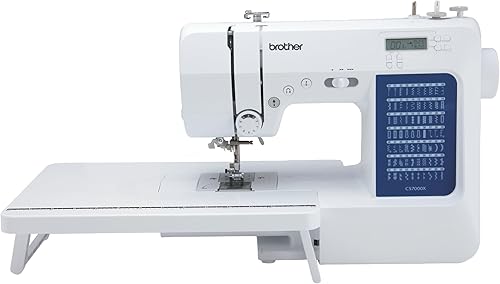
Choose the CS7000X for everyday sewing and practical quilting accessories, or the XR9550 for built-in lettering and decorative choices. The Brother CS7000X vs XR9550 decision comes down to the projects you want to make, not which machine has the largest stitch total.
Both are computerized sewing and quilting machines with an LCD display, automatic needle threading, a drop-in top bobbin, a wide table and a protective hard case or cover. Their shared basics make the differences in accessories, lettering and carrying weight more useful deciding points.
For a wider look at the brand, see our Brother sewing machine comparison. If you're still deciding on control style, our guide to mechanical vs computerized sewing machines explains that choice.

Brother CS7000X vs XR9550: which fits your projects?
The CS7000X is the better starting point for practical sewing and early quilt projects. Choose the XR9550 when you can name a real use for its lettering, such as initials on a fabric pouch or words on a quilt label.
Write down your next 3 projects before comparing features. A pair of curtains, a garment repair and a patchwork cushion call for different tools than personalized gifts and decorative borders.
For straight seams, hems and repairs, focus on the right needle, presser foot and stitch settings. A bigger stitch library adds creative options, but it doesn't remove the need to learn those basics.
Skip the CS7000X if built-in letters are essential to your plans. Skip the XR9550 if its main appeal is the larger number on the box and you expect to use only a few utility stitches.
Neither should be chosen as a dedicated machine for repeated work through very thick seams or heavy leather. A metal frame or quilting label alone does not establish that kind of capacity.
Which has the more useful stitch selection?
The XR9550 offers more creative choices, while the CS7000X covers utility, decorative, heirloom and quilting functions without an alphanumeric set. For ordinary construction work, stitch type matters more than total count.
The CS7000X has 70 built-in stitches. The XR9550 has 165, divided into 110 utility, decorative and heirloom stitches plus 55 alphanumeric stitches.
That split matters because the larger total includes letters and numbers. It doesn't mean the XR9550 offers more than twice as many choices for constructing a seam.
Choose the XR9550 if you expect to sew small words, initials or repeated decorative patterns. Think of these as stitches formed while feeding fabric through the machine, rather than a substitute for a dedicated embroidery system.
For lettering, practice on a scrap with the same fabric layers and stabilizer as your project. Mark a guide line first, and leave enough room around the words for seams or trimming.
Brother CS7000X vs XR9550 for buttonholes
Both models offer one-step auto-size buttonholes, so either can support garment projects that need them. The CS7000X has 7 styles and the XR9550 has 8.
Choose by the shapes you want to use, rather than treating one extra style as a major advantage. A clean buttonhole on your chosen fabric matters more than an unused option.
Make a sample through the same fabric and interfacing as the finished garment. Check it with the actual button before cutting any openings, and mark every position before starting.
Which accessory set will you actually use?
The CS7000X gives you the larger included foot set and a quilt guide. The XR9550's clearly named feet make it easy to match its accessories to common garment and craft jobs.
The CS7000X includes 10 sewing feet, while the XR9550 includes 8 sewing and quilting feet. More feet are useful only when they suit techniques you plan to learn.
The XR9550 set covers zigzag, buttonhole, zipper, button sewing, overcasting, blind stitch, monogramming and quilting. That gives you specific tools to consider for closures, hems, edge finishing and decorative work.
Don't assume that a larger set includes every specialty foot you'll eventually want. Match any extra foot to the machine model, and follow the manual's stitch and needle-position instructions before sewing.
A walking foot can help feed layered fabric, but it serves a different purpose from a quilt guide. Our guide to what a walking foot does explains when that accessory is worth considering.
For more detail on the first model, read our Brother CS7000X review. Use the accessory section to plan what you'll learn first, rather than trying every attachment at once.
Which is the stronger choice for quilting?
Choose the CS7000X for its quilt guide and large needle-to-arm workspace, or the XR9550 for its stated drop-feed feature for free-motion work. Your quilting method should decide which advantage matters.
For piecing, accurate cutting and a steady seam allowance come first. Start with small blocks, check their finished size and correct errors before joining a whole quilt top.
For quilting through layers, support the project's weight beside and behind the machine. A quilt hanging off the table can pull against your hands and make controlled feeding harder.
A wide extension table supports fabric outside the machine, while needle-to-arm space determines the opening you work within. These are different measurements, so don't treat a wide table as proof of a larger throat.
The CS7000X has a fixed needle bar, which Brother says helps produce cleaner stitching and even lines. Without comparable needle-to-arm measurements, there isn't a sound basis for naming either model the roomier choice overall.
The XR9550's drop feed lets you move fabric yourself for free-motion sewing. Practice on small quilt sandwiches first, where you can work on hand movement and stitch spacing without managing a large quilt.
How should a beginner choose between them?
A beginner should choose by the first useful projects, rather than trying to predict every future hobby. The CS7000X suits a practical sewing plan; the XR9550 suits a plan that already includes lettering or decorative work.
Computerized stitch selection doesn't remove the learning curve. You still need to thread correctly, guide fabric without pulling it and recognize when the needle or stitch doesn't suit the material.
Start with woven cotton scraps and straight seams before moving to stretch fabrics or bulky intersections. This keeps the first lessons focused on feeding, seam allowance and stopping where you intend.
Don't buy either machine because it promises to handle every future task. If you're unsure which controls matter, our computerized sewing machine guide helps you compare the features you'll use regularly.
How do you set either machine up correctly?
Begin with the model's manual and a scrap seam, even if you've used another sewing machine before. Correct threading and bobbin installation prevent many problems that look like tension faults.
Set the machine on a firm table with room for your fabric and comfortable access to the controls. Keep the pedal clear of loose cords and position your chair so you aren't reaching upward to sew.
Install the needle in the direction and position shown in the manual. Choose a needle type and size suited to the fabric, and use only the bobbin type specified for the machine.
Thread the upper path with the presser foot raised, following the manual's sequence. Check that the bobbin unwinds in the required direction and that its thread passes through the proper guide.
Use the needle threader as instructed rather than forcing its mechanism. A threading aid still depends on correct needle position and a suitable needle and thread combination.
Sew a short sample using the same layers as your project. Check both sides, then change one setting at a time if the seam needs adjustment.
Which is easier to carry and store?
The XR9550 is lighter, making it the more practical choice if carrying weight is your main concern. It weighs 10.1 pounds, compared with 14 pounds for the CS7000X.
Include the extension table, pedal and accessories when thinking about a trip to class. Pack loose feet and needles in a small container so they don't shift around during travel.
The XR9550's hard cover contains protective Styrofoam that must stay in place. Brother specifies that it protects the machine from scratches, so don't discard it as ordinary packing material.
Store either machine covered in a dry place, with the needle area clear of loose fabric. Keep the manual accessible so returning to a partly finished project doesn't become a search for setup instructions.
How do you avoid jams, skipped stitches and fabric damage?
Start with correct threading, a suitable needle and gentle fabric guidance. These habits matter more to reliable everyday sewing than the size of the stitch menu.
Replace a bent or damaged needle instead of trying to compensate with tension changes. Use an appropriate needle for knits, and choose a stitch that can stretch with the seam where needed.
Don't pull fabric through the machine. Let the feed system move it while you guide the edge, and pause to reposition bulky work before its weight drags against the seam.
Before using a wide decorative stitch, confirm that the selected foot allows enough clearance. Follow the manual's procedure for checking needle movement, especially after changing feet or needle position.
Brother describes both top-bobbin systems as jam-resistant, but careful loading still matters. If thread bunches underneath, stop, remove the fabric carefully and rethread before making several tension changes.
Our guide to why a sewing machine keeps jamming gives you a useful troubleshooting order. Repeatedly sewing into the same fault can damage fabric and waste thread.
What care and support should you plan for?
Plan for regular lint removal and model-specific maintenance, along with correct power use. Small amounts of routine care are easier to manage than a packed bobbin area during a project.
Switch off and unplug the machine before cleaning or changing the needle. Follow the manual for removing accessible parts, brushing away lint and putting everything back in the correct position.
Use the cleaning method Brother specifies, and don't add oil unless the manual calls for it. Keep spare needles and compatible bobbins organized so a routine replacement doesn't stop your work.
Both machines are intended for US sale and 120-volt use. Brother warns that other use or sale may void the warranty, so buyers elsewhere should choose equipment intended for their local supply.
Brother provides lifetime technical support and a 25-year limited warranty for both models. Read the warranty documents for coverage details, and keep your receipt and model information together.
Should you consider the Brother HC1850 instead?
Consider the HC1850 when decorative sewing and quilting both feature in your plans. Its adjustable sewing speeds, stitch reference flip-chart and spring action quilting foot give you concrete reasons to compare it.
It has 185 built-in stitches: 130 sewing stitches and 55 alphanumeric stitches. It also includes 8 feet, a wide table and 8 one-step auto-size buttonhole styles.
The larger sewing-stitch library is useful if you enjoy choosing borders and decorative details. It is less persuasive if your immediate goal is shortening trousers or learning a consistent seam allowance.
Skip this detour if the CS7000X already matches your practical sewing needs or the XR9550 covers the lettering you want. An additional option helps only when one of its specific features solves a need.
Brother CS7000X vs XR9550: which should you buy?
Choose the CS7000X if your project list centers on repairs, garment basics and learning to quilt. Choose the XR9550 if simple lettering and decorative work are projects you intend to start soon.
For the Brother CS7000X vs XR9550 decision, use your next project as the tie-breaker. Plan the fabric, needle, thread and needed foot before ordering, so you can begin with a complete setup.
If your plans involve a different kind of work, compare other Brother sewing machine options. Pick the machine that supports those tasks, then build skill with a few useful stitches before exploring the rest.
Frequently asked questions
Which Brother machine has more built-in stitches?
The Brother XR9550 has 165 built-in stitches, compared with 70 on the CS7000X. Its total includes 110 utility, decorative and heirloom stitches plus 55 alphanumeric stitches.
Choose that broader library for lettering and decorative work; routine seams and hems do not require the larger total.
Which machine includes more sewing feet?
The Brother CS7000X includes 10 sewing feet and a quilt guide, while the XR9550 includes 8 sewing and quilting feet. Match the foot types to your projects before choosing.
For garment work, a useful zipper or buttonhole foot matters more than having extra feet you rarely use.
Are the CS7000X and XR9550 both suitable for quilting?
Both machines support quilting and include a wide table for supporting fabric. The CS7000X has a large needle-to-arm workspace and a quilt guide; the XR9550 includes a quilting foot and drop feed for free-motion work.
Quilt size, fabric support and your chosen quilting method should guide the decision.
Do the Brother CS7000X and XR9550 have lettering stitches?
The XR9550 includes 55 alphanumeric stitches, while the CS7000X does not include an alphanumeric stitch set. Choose the XR9550 if simple stitched letters are part of your plans.
Built-in lettering is different from a dedicated embroidery system, so it should not be your reason to expect custom logos or large designs.
What should you compare before buying either machine?
Start with your next projects, then compare stitch types, useful presser feet, fabric space and carrying weight. Both models include computerized controls and threading aids, so those shared features do not settle the choice.
Also check local power requirements and read the warranty conditions before ordering.