Mechanical vs Computerized Sewing Machine: Which Is Better? (October 2026)
For a computerized sewing machine vs mechanical choice, favor mechanical controls for routine repairs and computerized selection for varied stitch work. Match workspace, feet and buttonhole options to your projects before deciding.
On this page (10 sections)
- Computerized sewing machine vs mechanical: what actually changes?
- Which features matter more than stitch count?
- Who should choose the Brother XM2701?
- Who should choose the Brother CS7000X?
- Who should choose the Brother CS5055?
- Which type works better for buttonholes and quilting?
- How should you set up either type for the first project?
- What mistakes should you avoid with both types?
- How do care and repair needs compare?
- Final choice: computerized sewing machine vs mechanical
Choose a mechanical sewing machine for familiar, direct adjustments or a computerized machine for electronic stitch selection and more stitch choices. In a computerized sewing machine vs mechanical comparison, your usual projects matter more than the size of the stitch menu.
For repairs and simple hems, a clear threading path and controls you understand can be enough. For garment details or quilting, buttonhole choices, fabric support and included feet deserve more attention.
The Brother XM2701, CS7000X and CS5055 show these differences without requiring you to compare different brands. Each suits a different sewing routine, so start with what you expect to make.

Computerized sewing machine vs mechanical: what actually changes?
The main difference is how you select and adjust stitches. Mechanical machines generally use dials or levers, while computerized machines use electronic controls, often with a display.
Both types still require correct threading, a suitable needle and careful fabric handling. “Mechanical” doesn't mean hand-powered, and “computerized” doesn't mean the machine cuts fabric or completes a garment for you.
Neither label tells you how well a machine will handle a thick seam. Fabric layers, needle choice, feed, presser-foot clearance and the machine's intended use all matter.
A larger stitch menu also doesn't guarantee features such as automatic thread cutting, embroidery or special speed controls. Check each function separately rather than assuming it comes with electronic selection.
For a closer explanation of the controls, read what a computerized sewing machine does.
Mechanical vs computerized sewing machines for beginners
Choose the control style that makes a basic seam easiest to set up. A beginner doesn't need to master every stitch before making something useful.
Think through this sequence: select a straight stitch, choose a suitable length, thread the machine and sew a practice seam. Controls that make those steps clear are more useful than decorative options you won't use.
If you dislike scrolling through choices, mechanical controls may suit you. If numbered stitch selection and a display feel clearer, starting with a computerized model is reasonable.
Which features matter more than stitch count?
Prioritize the stitches, feet and workspace your projects require. Most everyday construction uses a small group of stitches repeatedly.
For woven fabric, start with a straight stitch and a suitable way to finish raw edges. For knits, check for an appropriate stretch stitch and use a needle suited to the fabric.
Garment sewing may call for a zipper foot, blind hem option or buttonhole function. Decorative patterns matter when you plan to use them on visible details, rather than simply because they're available.
Included feet deserve a closer look than the total number suggests. Match each foot to a task, and check compatibility before buying extra accessories.
Workspace matters when fabric must pass between the needle and the machine's body. A table supports fabric outside that space, but it doesn't increase the opening beside the needle.
Write down your next 3 projects, then use our guide to choosing a sewing machine to turn them into a short feature checklist.
Who should choose the Brother XM2701?
Choose the Brother XM2701 for everyday mending and straightforward clothing projects when you prefer mechanical controls. Its 27 built-in stitches include zigzag, stretch, blind hem and decorative options.
That range gives you room to move beyond straight seams without making a large stitch menu the focus. The free arm is useful when working around cuffs, sleeves and pant legs.
Its 6 included feet cover buttonholes, zippers, zigzag sewing, narrow hems, blind stitching and button sewing. Those are practical tasks for someone maintaining clothes or learning basic garment construction.
An automatic needle threader and drop-in top bobbin help with setup. These aids also show why you shouldn't assume that choosing mechanical means giving up threading convenience.
Skip the XM2701 if multiple buttonhole styles are a priority or you specifically want electronic stitch selection. Choose it for a repeatable sewing routine, rather than expecting it to match the quilting accessory package below.
Who should choose the Brother CS7000X?
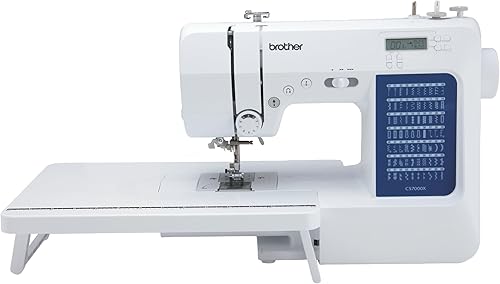
Choose the Brother CS7000X for patchwork, quilting and projects that need fabric support. Its wide table and quilt guide give a new quilter useful accessories from the start.
It has 70 built-in stitches covering utility, decorative, heirloom and quilting work. The LCD display suits buyers who prefer electronic selection, while the larger needle-to-arm workspace helps accommodate larger projects.
The package includes 10 sewing feet and a protective hard case. If you plan to attend classes, check the full carrying arrangement and how you'll transport the table and other supplies.
Skip this model if you mainly repair seams and won't use the quilting accessories. Those extras need storage space and offer little benefit when most of your work is a short hem or simple repair.
For quilting, plan the work surface as carefully as the machine. Fabric hanging over the edge can drag against your stitching, even when the machine has a supporting table.
Who should choose the Brother CS5055?
Choose the Brother CS5055 for electronic stitch selection and garment details when a quilting package isn't your main goal. Its 60 built-in stitches cover utility, decorative and heirloom work.
The LCD display provides the electronic interface some beginners prefer. It also includes 7 sewing feet, an automatic needle threader and a drop-in top bobbin.
At 10.5 pounds, it's the lightest of these 3 models. That matters if you must lift the machine from a cupboard for each session, though your table still needs to provide a steady base.
Skip the CS5055 if you want the CS7000X's included wide table and quilt guide. If you already know quilting will be a regular activity, compare the complete equipment you need rather than choosing by stitch totals.
Its metal frame and fixed needle bar don't remove the limits of a home sewing machine. For bulky fabric, judge the complete seam stack and follow the manual rather than treating those features as permission to force material through.
Which type works better for buttonholes and quilting?
For buttonholes, choose by the styles and process you need; for quilting, choose by workspace and fabric support. Control type alone settles neither choice.
The XM2701 has a one-step auto-size buttonhole, while both computerized models offer 7 one-step auto-size styles. A single style can cover ordinary closures, while extra choices suit buyers who want different garment finishes.
Before sewing buttonholes, prepare a scrap with the same fabric, interfacing and number of layers as the finished area. Check that the button passes through the sample opening before cutting into your garment.
For patchwork, accurate seam allowances matter more than decorative stitch variety. Practice keeping the fabric aligned with your chosen guide without pulling it from behind the foot.
For larger quilts, consider where the bulk will sit and how easily you can reposition it. Our sewing machines for quilting guide explains which features deserve attention as projects grow.
How should you set up either type for the first project?
Start with the manual, a suitable needle and a scrap of your project fabric. Learn a reliable straight-seam setup before exploring decorative stitches.
- Choose a stable work surface. Leave space behind and beside the machine so fabric can move without catching or hanging heavily.
- Check the power requirements. All 3 models here are intended for sale in the US at 120 volts, and other use or sale may void the warranty.
- Fit the right needle and bobbin. Follow the manual for needle orientation, bobbin type and winding rather than using parts just because they appear to fit.
- Thread in the correct order. Raise the presser foot when threading the upper path, and follow the model's instructions for the needle position and threader.
- Sew a sample seam. Use the same layers as your project, then inspect both sides before changing settings.
Keep your first sample beside the machine as a reference. Change one setting at a time so you can tell which adjustment improves the seam.
For buttonholes or decorative work, repeat the sample whenever you change fabric or interfacing. A setting that works on a firm woven scrap may behave differently on a soft knit.
What mistakes should you avoid with both types?
Avoid forcing fabric, chasing stitch counts and changing tension before checking threading. Electronic controls don't prevent these mistakes, and direct dials don't make them easier to correct.
Buying for projects you might never make
Buy for your regular work and one realistic next step. A long decorative menu has little value if your machine spends most of its time shortening curtains.
The same applies to accessories. An included quilting table helps a quilter, but it shouldn't decide the purchase for someone who only wants to mend clothes.
Pulling fabric through a difficult seam
Let the feed move the fabric while your hands guide it. Pulling can bend the needle and distort the seam.
If the machine struggles at a bulky crossing, stop and assess the layers, needle and technique. Don't keep pressing the pedal in the hope that more speed will solve the problem.
Treating every poor seam as a tension fault
Check threading, bobbin placement and needle condition first. A missed thread guide or incorrectly seated bobbin can look like a tension problem.
If fabric bunches or thread tangles underneath, stop and clear the cause before sewing again. Our guide to why a sewing machine keeps jamming gives you a useful order for those checks.
Assuming computerized means automatic sewing
You still need to lower the presser foot, guide the work and select settings suited to the fabric. A stitch menu is a control aid, not a substitute for basic sewing skills.
How do care and repair needs compare?
Both types need lint removal, fresh needles and care that follows the manual. A mechanical machine still has parts that wear, while a computerized model adds electronic controls that may need specialist service.
Switch off and unplug the machine before cleaning or changing parts as directed. Remove lint from accessible bobbin and feed areas with the recommended tools, and don't force debris farther inside.
Oil only where the manual directs you, using the specified product. Don't assume advice for an older machine applies to a newer model.
Replace a bent, damaged or worn needle instead of trying to correct its symptoms with tension changes. Keep the machine covered when stored, and avoid leaving it where damp conditions could affect its parts.
Before buying, ask a nearby repair shop whether it services the exact model. Access to help matters more than a broad claim that one control type is always easier or cheaper to repair.
Brother offers lifetime technical support for these machines. Support can help with setup questions, but check the terms and service arrangements separately if repair access is central to your decision.
Final choice: computerized sewing machine vs mechanical
Make your computerized sewing machine vs mechanical decision around the work you'll repeat each month. Then choose the model whose controls and accessories make that work easier to organize.
- Choose the XM2701 for mending, hems and basic clothing construction when you prefer direct adjustments.
- Choose the CS7000X when quilting is a firm plan and you'll use the included fabric support and quilting accessories.
- Choose the CS5055 when you want electronic selection for garment details without choosing mainly for quilting equipment.
If you're undecided, picture setting up your most common project from start to finish. Favor the machine that removes a real obstacle, such as unclear controls or unsupported fabric, rather than the one with the longest feature list.
For the next step, read whether you need a computerized sewing machine, then compare candidates in our best computerized sewing machines guide. If you're still defining your projects, start with the complete sewing machine buying guide.
Frequently asked questions
Is a mechanical sewing machine easier for beginners?
A mechanical machine is easier for beginners who prefer visible dials and a short routine for basic seams. A computerized machine can suit someone who finds a display clearer.
Start by comparing threading, bobbin loading and stitch selection, since you must learn those steps with either type.
Do computerized sewing machines sew better?
Computerized controls don't automatically produce better seams. Needle choice, threading, fabric handling and suitable settings still determine much of the result.
Electronic selection helps you choose stitches, but it doesn't remove the need to practice on scraps or correct a worn needle, threading mistake or poorly supported project.
Can a mechanical sewing machine make buttonholes?
Yes, a mechanical sewing machine can make buttonholes when it has that function. The Brother XM2701 includes a one-step auto-size buttonhole.
Follow the instructions for its buttonhole foot, and sew a sample with the same fabric layers and interfacing before making buttonholes on your finished garment.
Are computerized sewing machines harder to repair?
Repair difficulty depends on the fault and access to suitable service. Electronic control faults may need different parts or skills from mechanical adjustments, but either type can need professional work.
Before buying, ask a local repair shop which models it services and what its inspection process involves.
Which type is better for quilting?
Choose a quilting machine by workspace, fabric support and suitable accessories before control type. Among these models, the Brother CS7000X is the clearest quilting choice because it includes a wide table and quilt guide.
Plan how you'll support the rest of the quilt beyond the machine, too.