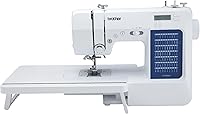
What Is a Computerized Sewing Machine?
A computerized sewing machine uses electronic controls to select stitches and settings, often shown on a screen. You still thread the machine, choose suitable needles and feet, and guide the fabric.
On this page (9 sections)
- What is a computerized sewing machine?
- How does a computerized sewing machine work?
- Which computerized features are worth having?
- How do computerized and mechanical machines compare?
- Which models suit quilting and decorative sewing?
- Which options make sense for beginners and mending?
- What should you check before buying?
- How should you set up and care for one?
- Which computerized sewing machine should you choose?
A computerized sewing machine uses electronic controls to select stitches and settings, usually with a display showing your choices. It helps you choose how to sew, but you still prepare the machine and guide the fabric.
The useful question is which controls and accessories fit your projects. Extra decorative stitches won't help much with a loose hem, while a wide table can help support a quilt.
What is a computerized sewing machine?
A computerized sewing machine has electronic stitch controls instead of relying entirely on mechanical selectors. Buttons let you choose a pattern or change settings, with the exact controls varying by model.
“Computerized” doesn't mean it needs a laptop, connects to the internet, or automatically sews a design file. Those are separate capabilities that you should confirm before buying.
An electric motor, needle threader, or automatic buttonhole alone doesn't make a machine computerized. Mechanical machines can include sewing conveniences too.
For the wider category, see our computerized sewing machines guide. Our home sewing machine buying guide explains how this choice fits alongside fabric needs, workspace, and everyday tasks.
How does a computerized sewing machine work?
You select a stitch electronically, then sew with the correct foot, needle, and fabric setup. The machine forms the selected pattern while you steer the seam.
For a basic seam, the process is straightforward:
- Install a suitable needle and thread the machine as directed.
- Load the correct bobbin in the specified direction.
- Select a straight stitch and its recommended settings.
- Fit the required foot and lower it over a fabric scrap.
- Sew a sample seam before working on the project.
Use scraps from the actual project, including the same number of layers. A setting that works on thin cotton may need adjustment for a folded hem or stretchy knit.
Let the feed dogs move the fabric. Guide without pulling, since pulling can bend the needle and distort the seam.
Which computerized features are worth having?
Clear controls and useful stitch functions matter more than a large stitch total. Choose features that remove a step you find difficult or support something you plan to make.
What does a computerized sewing machine's LCD screen do?
An LCD screen shows stitch information, and some models also display settings. Check whether you can easily identify the selected stitch and change its length or width.
A screen doesn't replace the manual's stitch chart. You still need to match the stitch to the correct presser foot and follow any limits on adjustments.
Which built-in stitches will you actually use?
Straight, zigzag, suitable stretch stitches, and buttonholes cover many home sewing jobs. Decorative patterns become useful when you plan borders, embellishment, or stitched lettering.
Look at the stitch chart rather than comparing totals alone. Alphanumeric stitches are sewn letters and numbers; they don't by themselves establish that a machine can embroider imported designs.
Are automatic buttonholes and needle threaders essential?
They're useful conveniences, especially if you make buttoned garments or find needle threading difficult. They aren't substitutes for careful setup.
Practice buttonholes on scraps with the same fabric layers and stabilizer as the garment. Follow the needle threader's instructions, since needle position and compatibility affect whether it works correctly.
How do computerized and mechanical machines compare?
A computerized model suits someone who prefers button-based stitch selection, while a mechanical model suits someone who prefers turning dials. Neither control style removes the need to learn threading and fabric handling.
Don't assume a computerized model handles thicker seams simply because it has more stitches. Fabric capacity depends on the machine's design, the needle, and the seam you're asking it to sew.
For a closer comparison of controls and care, read mechanical vs computerized sewing machines. Choose the interface you understand, then check whether the machine supports your intended work.
Which models suit quilting and decorative sewing?
The Brother CS7000X suits buyers who want quilting accessories, while the Brother XR9550 suits buyers who want stitched lettering and more decorative choices. Their included tables help support fabric beside the needle, though you still need space around the machine.
Brother CS7000X: for sewing and quilting projects
The CS7000X combines an LCD display with 70 built-in stitches, 7 one-step auto-size buttonholes, and an automatic needle threader. It includes a wide table, 10 sewing feet, a quilt guide, and a protective hard case.
Choose it if patchwork, garments, and occasional larger projects are part of your plan. The accessory bundle gives you more to work with than stitch variety alone.
Skip it if your main goal is sewn letters and numbers; the XR9550 specifically includes those patterns. For occasional repairs, decide whether you'll use the table and extra feet.
Brother XR9550: for lettering and embellishment
The XR9550 offers 110 utility, decorative, and heirloom stitches, including 8 auto-size buttonhole styles, plus 55 alphanumeric stitches. Push-button selectors and an LCD screen handle stitch choices and settings.
Its wide table, 8 sewing and quilting feet, free arm, and drop feed support several project types. Choose it if stitched lettering or decorative borders are a specific part of your plans.
Skip it if you mainly mend straight seams or expect to load custom embroidery designs. Keep the protective foam inside its hard cover, as Brother instructs.
Our computerized sewing machine recommendations can help you compare these options against your project list.
Which options make sense for beginners and mending?
The Brother CS5055 suits beginners who want electronic controls, while the XM2701 is worth comparing if computerized selection isn't a priority. Start with the jobs you'll sew during your first few months.
Brother CS5055: for learning electronic stitch selection
The CS5055 has an LCD display, 60 built-in stitches, 7 one-step auto-size buttonholes, and an automatic needle threader. Its accessories include 7 sewing feet, and it has an LED-lit work area.
Choose it for learning garment seams, buttonholes, and decorative details with electronic controls. Start with a straight stitch and one useful finishing stitch before exploring the rest.
Skip it if you specifically want the CS7000X's included wide table and quilting accessories. Compare the full package before deciding which machine fits your workspace.
Brother XM2701: for everyday alterations
The XM2701 offers 27 built-in stitches, an auto-size buttonhole, an automatic needle threader, and 6 sewing feet. Its free arm helps you position cuffs, sleeves, and pant legs around the sewing area.
Choose it as an alternative for ordinary repairs and alterations when electronic stitch selection isn't your main reason to buy. Skip it if an LCD display and computerized controls are requirements.
For help deciding whether electronic controls solve a real need, read whether you need a computerized sewing machine.
What should you check before buying?
Match the machine to your fabric, projects, and available space. Write down 3 likely projects and identify the functions each needs.
- Garments: Check buttonhole choices, zipper and blind hem feet, and suitable stretch stitches.
- Quilting: Consider fabric support, needle-to-arm space, included feet, and room behind the machine.
- Alterations: Look for a free arm and the stitches needed for your hems and repairs.
- Storage: Measure the sewing surface and check whether you'll need to lift the machine regularly.
- Support: Find the manual and confirm access to service before buying.
All 4 models discussed here are intended for the US at 120 volts. Check electrical compatibility before ordering for use elsewhere.
Compare broader options in our best sewing machines guide. If thick seams dominate your plans, read what makes a sewing machine heavy duty rather than choosing by stitch count.
How should you set up and care for one?
Correct threading and routine lint removal prevent avoidable trouble. Put the machine on a firm surface, provide light around the needle, and support fabric so it doesn't drag off the table.
Follow the manual's threading sequence and presser-foot position. Use the specified bobbin type, insert the needle fully in the correct direction, and check foot compatibility before starting.
Switch off and unplug the machine before cleaning or changing parts as directed. Brush out accessible lint, and oil only the points the manual identifies.
If a seam goes wrong, stop before changing several settings. Rethread, inspect the needle, and check bobbin placement first; our guide to sewing machine jams explains common causes.
Don't try to correct every loop or uneven seam with the tension dial. Follow a step-by-step check using our sewing machine tension guide.
Which computerized sewing machine should you choose?
Understanding what a computerized sewing machine is gives you a practical decision rule: buy electronic controls for easier stitch selection, then choose accessories around your projects.
Pick the CS5055 for everyday sewing with a screen, the CS7000X for its quilting bundle, or the XR9550 for alphanumeric and decorative stitches. Compare the XM2701 if ordinary alterations matter more than computerized controls.
Before ordering, check the manual for the setup steps you'll use most. Use the computerized machine guide to narrow your choice by project rather than the longest feature list.
Frequently asked questions
What does a computerized sewing machine do?
A computerized sewing machine uses electronic controls to select stitch patterns and settings, often with a screen showing your choices. It still needs correct threading, a suitable needle, and your guidance at the fabric, so start by learning a straight stitch before exploring decorative options.
Is a computerized sewing machine good for beginners?
Yes, a computerized sewing machine can suit beginners who find its buttons and display easy to understand. Choose around your first projects, clear instructions, and useful feet rather than stitch count alone, then practice threading and sewing on scraps before starting a garment or quilt.
What is the difference between a computerized and mechanical sewing machine?
A computerized machine uses electronic controls for stitch selection, while a mechanical machine uses physical controls such as dials. Both need electricity, threading, suitable needles, and fabric handling, so an electric motor or automatic needle threader alone doesn't tell you which control system a machine uses.
Do computerized sewing machines sew by themselves?
No, a computerized sewing machine doesn't complete a project by itself. It controls selected stitch functions, but you still prepare the fabric, position seams, guide the work, and change thread or feet as needed, so treat automatic features as help with specific steps rather than complete automation.