7 Best Brother Sewing Machines (October 2026)
The best Brother sewing machines include the Brother XM2701 for household repairs, the Brother CS7000X for beginning quilters, and the Brother XR9550 for decorative projects.
On this page (7 sections)
- Which is the best Brother sewing machine for your projects?
- How do the Brother models compare on useful features?
- What should you check before choosing a Brother model?
- How should you set up a new Brother sewing machine?
- Which sewing mistakes should beginners avoid?
- How do you care for a Brother sewing machine?
- Which Brother sewing machine should you buy?
The Brother XM2701 is the best Brother sewing machine for everyday repairs and basic projects. Choose the CS7000X for quilting, the XR9550 for decorative sewing or the ST371HD when heavier-fabric repairs shape your buying decision.
Start with what you'll sew most often. A useful presser foot, enough fabric support and controls you understand matter more than a long menu of stitches you'll rarely select.
If you're still sorting out the basics, start with our complete sewing machine buying guide. For a wider set of brands and uses, see our best sewing machines roundup.
Our picks at a glance
-
1

-
2
-
3

Which is the best Brother sewing machine for your projects?
The XM2701 fits general household sewing, while the other models serve more specific routines. Match the machine to your next few projects, then check whether its controls and accessories suit how you want to work.
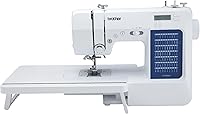
Brother XM2701
- 27 built-in stitches
- Automatic needle threader
- Jam-resistant drop-in top bobbin
- 6 sewing feet
The XM2701 covers repairs, simple garments and everyday sewing without a large stitch menu. Its free arm helps you work around cuffs, sleeves and pant legs.
Pros
- Includes zipper, blind stitch and narrow hem feet
- Automatic needle threader eases setup
- Free arm for tubular pieces
Cons
- Smaller stitch range than the computerized options
- No wide table among the included accessories
The XM2701 is the sensible starting point for hemming, simple garments, cushion covers and routine repairs. Its 27 built-in stitches include blind hem, zigzag, stretch and decorative options, plus an auto-size buttonhole.
The included feet cover zipper insertion, blind stitching, narrow hems and button tasks. That gives a beginner useful techniques to learn before specialty accessories become necessary.
Its free arm helps with cuffs, sleeves and pant legs, provided the opening fits around the arm. Very small openings may still need to be sewn from the inside with the rest of the garment kept clear.
Buy it if you want to learn construction and repair skills without choosing among many decorative patterns. Skip it if quilting support or stitched lettering is central to your plans, since other picks address those needs more directly.
The automatic needle threader helps with one setup step, but you still need to follow the full threading path. Our Brother XM2701 review explains its features and tradeoffs in more detail.
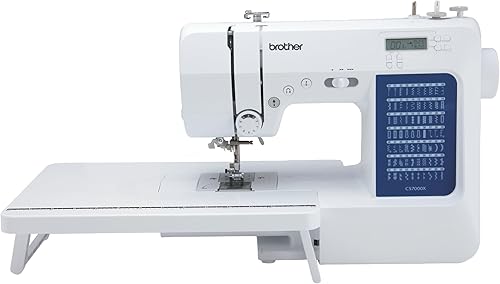
Brother CS7000X
- 70 built-in stitches
- Wide table
- 10 sewing feet and quilt guide
- Larger needle-to-arm workspace
The CS7000X suits buyers planning quilts alongside clothing and repairs. A wide table, quilt guide and larger needle-to-arm workspace make its accessory package useful for that mix.
Pros
- Wide table supports larger pieces
- Quilt guide included
- Protective hard case included
Cons
- Table needs extra surface space
- Quilting accessories may go unused for occasional repairs
The CS7000X is the strongest fit for a first quilting setup that will also handle general sewing. Its wide table and larger needle-to-arm workspace address different parts of managing a larger piece.
The table supports fabric beside the needle, while the space within the machine gives you room to handle the section passing through it. Neither removes the need to support the rest of a quilt on your work surface.
You get 70 built-in stitches, 7 auto-size buttonhole styles, 10 feet and a quilt guide. The LCD display provides computerized selection, and a protective hard case is included for storage or transport.
Choose it if patchwork, quilted home projects and garment sewing will share your sewing time. Skip it if your routine is occasional mending and you have nowhere to leave the table set up.
Before buying, measure the desk with room for your hands and fabric on both sides. Our Brother CS7000X and XR9550 guide helps weigh its project support against a broader decorative stitch range.
Brother XR9550
- 165 built-in stitches
- LCD display
- Wide table
- 8 sewing and quilting feet
The XR9550 suits decorative sewing and stitched lettering, with utility stitches for construction work too. Its wide table and drop feed also support quilting projects.
Pros
- Includes 55 alphanumeric stitches
- Push-button stitch selection with LCD display
- Wide table and protective hard cover included
Cons
- Large stitch menu adds little for basic mending
- Alphanumeric stitches do not replace a dedicated embroidery machine
The XR9550 suits sewers who want decorative patterns and stitched letters as part of their projects. Its 165 built-in stitches combine 110 utility, decorative and heirloom stitches with 55 alphanumeric options.
Those letters can add names or simple labels to suitable fabric pieces. They don't turn a sewing machine into a dedicated embroidery machine for large designs or imported artwork.
Push-button selectors and an LCD display let you choose stitches and settings. The wide table, quilting foot and drop feed also make this a useful option for buyers mixing decorative sewing with quilting.
Choose it if you can name projects that will use the extra stitch choices, such as embellished pockets, borders or fabric labels. Skip it if you mostly shorten trousers or close split seams, where the extra menu offers little practical benefit.
Try lettering on a matching scrap before sewing the final piece, checking spacing and fabric support. Keep the protective hard cover's inner Styrofoam in place, as Brother instructs.
Our Brother CS7000X vs XR9550 comparison explains the choice between these two quilting-capable models.
Brother XM3700

- 37 built-in stitches
- Automatic needle threader
- Free arm
- 5 sewing feet
The XM3700 suits garment projects involving sleeves, cuffs and other small tubes. Its removable accessory compartment exposes the free arm, while the included feet cover common closures and hems.
Pros
- Built-in accessory storage
- LED work light
- Includes zipper, blind stitch and buttonhole feet
Cons
- Fewer included feet than the XM2701
- No wide table among the included accessories
The XM3700 suits garment projects that move between flat seams and smaller tubular sections. Slide off its accessory compartment to expose the free arm for sleeves, cuffs and similar work.
Its 37 built-in stitches give you options for garment construction and decorative details. The 5 included feet cover zigzag sewing, zippers, blind stitching, buttonholes and button sewing.
Built-in accessory storage helps keep the smaller tools together when you pack away the machine. The LED light illuminates the work area, though extra room lighting can still help you see dark fabric clearly.
Choose it if those garment tasks match your plans and the included foot set covers what you'll use. Skip it if you specifically need a narrow hem foot in the box or a wide table for larger pieces.
Don't choose it over the XM2701 simply because the stitch total is higher. Compare the actual patterns you'll use, then check whether the accessory differences save you from buying an extra foot.
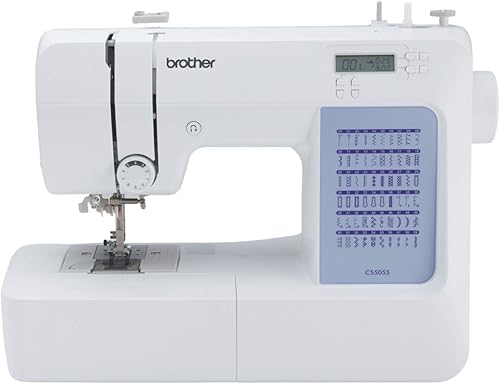
Brother CS5055
- 60 built-in stitches
- LCD display
- Fixed needle bar
- 7 sewing feet
The CS5055 suits garment makers who want an LCD display and several buttonhole styles. Its larger needle-to-arm workspace provides room for handling fabric without choosing a quilting-focused accessory package.
Pros
- LCD display for stitch selection
- Fixed needle bar
- LED-lit work area
Cons
- No wide table among the included accessories
- Fewer included feet than the CS7000X
The CS5055 is the pick for garment makers who want computerized stitch selection without choosing a quilting-focused package. Its LCD display gives you a place to view your selected stitch.
It has 60 built-in stitches and 7 auto-size buttonhole styles. That range is useful if your sewing includes different garment finishes and decorative details alongside ordinary construction seams.
The machine includes 7 feet, a fixed needle bar and a larger needle-to-arm workspace. Brother says the fixed needle bar limits movement for cleaner finishing.
Choose it if you prefer a display and expect to use several buttonhole styles. Skip it if quilting is already a firm plan, because the CS7000X includes more of the accessories suited to that work.
Brother describes the feed system as suitable for denim, tweed and other thick fabrics. For jeans hems, assess the thick seam crossings rather than judging the project by a flat fabric swatch alone.
Our Brother CS5055 review takes a closer look at its place in an everyday sewing setup.
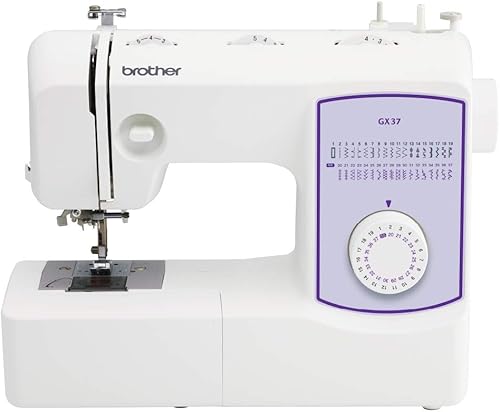
Brother GX37
- 37 built-in stitches
- Stitches printed on the machine
- Automatic needle threader
- 6 sewing feet
The GX37 suits learners who want to see their stitch choices on the machine and select them with a dial. Its included feet cover zippers, blind hems, narrow hems and button tasks.
Pros
- Printed stitch guide beside the controls
- Narrow hem foot included
- Soft dust cover included
Cons
- No LCD display for stitch selection
- No wide table among the included accessories
The GX37 suits learners who want to see their stitch choices on the machine and turn a dial to select them. That clear connection between the printed guide and control can suit someone who prefers physical selectors.
Its 37 built-in stitches cover utility and decorative work. The included feet handle zippers, blind hems, narrow hems and button tasks, while the free arm helps with suitable tubular pieces.
Choose it if you want that control style and expect to learn several garment finishes. Skip it if an LCD display is part of what you want from a new machine.
The narrow hem foot is useful for folded edges on suitable lightweight projects, but it takes practice to feed the fabric evenly. Learn the entry fold on a scrap before using it on a finished garment.
A soft dust cover is included for storage. If you carry the machine to classes, plan how you'll support and protect it during the trip rather than treating the dust cover as a carrying case.
Brother ST371HD

- 37 built-in stitches
- Metal needle plate
- 6 sewing feet
- Free arm
The ST371HD suits buyers whose repairs include heavier materials. Its mechanical design, heavyweight needles, metal needle plate and included nonstick foot support that focus.
Pros
- Heavyweight needles included
- Includes nonstick and spring-action zigzag feet
- Drop feed for free-motion sewing
Cons
- Heavy-duty design does not establish a maximum fabric thickness
- Less suited to buyers prioritizing decorative stitch choice
The ST371HD is the heavier-fabric choice in this group, with heavyweight needles and a metal needle plate. Brother describes it for work ranging from lightweight silk to materials such as denim, leather and suede.
Its included feet include a nonstick foot and a spring-action zigzag foot. The mechanical machine also has drop feed for free-motion sewing and a free arm for suitable garment sections.
Choose it if repairs and alterations regularly involve heavier materials, and decorative variety is a lower priority. Skip it if your main goal is stitched lettering or the quilting accessory package supplied with the CS7000X.
A heavy-duty label doesn't tell you how every stack of fabric will behave. A folded jeans hem crossing a side seam can be much more demanding than several flat layers.
Use the right needle and avoid forcing a thick section under the foot. Stop if the needle struggles to pass through, rather than pressing harder on the pedal.
Our Brother vs Singer comparison helps if you're considering another brand's approach to everyday and heavier-fabric sewing.
How do the Brother models compare on useful features?
Controls, fabric support and task-specific accessories explain the main differences here. We compared those features with common repair, garment and quilting needs when setting the order.
| Product | Best for | Stitches | Buttonholes | Included feet | Our score |
|---|---|---|---|---|---|
| Brother XM2701 | household repairs | 27 built-in | 1 one-step, auto-size | 6 | 9.1 |
| Brother CS7000X | beginning quilters | 70 built-in | 7 one-step, auto-size styles | 10 | 8.9 |
| Brother XR9550 | decorative projects | 165 built-in | 8 one-step, auto-size styles | 8 | 8.5 |
| Brother XM3700 | small garments | 37 built-in | 1 one-step, auto-size | 5 | 8.4 |
| Brother CS5055 | computerized garment sewing | 60 built-in | 7 one-step, auto-size styles | 7 | 8.3 |
| Brother GX37 | dial-control learners | 37 built-in | 1 one-step, auto-size | 6 | 8.1 |
| Brother ST371HD | heavier-fabric repairs | 37 built-in | Auto-size | 6 | 7.7 |
The XM2701 leads for broad household use because its stitch choices and feet cover common jobs without a large menu. A more specialized buyer should choose by project fit rather than assume the first model is always the right one.
The CS7000X moves ahead for quilting support, while the XR9550 makes more sense for decorative work. The ST371HD belongs on the shortlist when heavier materials matter more than computerized controls.
What should you check before choosing a Brother model?
Check your fabric, controls, workspace and required feet before comparing stitch totals. Write down 3 projects you want to finish, including the fabric and closures each needs.
Which Brother sewing machine has the controls you want?
The GX37 offers dial-selected stitches, while the CS7000X, XR9550 and CS5055 provide computerized selection with an LCD display. Choose the control style you want to use each time you sit down.
A display can help you see the selected stitch and settings, but it doesn't replace learning threading, needle choice or fabric handling. Dial controls also need careful setup when you change techniques.
Our guide to mechanical vs computerized sewing machines explains the daily differences. Neither type is automatically the better beginner choice.
Which stitches will your projects actually use?
Straight stitch, zigzag, a suitable stretch stitch and buttonholes cover many ordinary home projects. Decorative patterns earn their place when you plan to use them on visible details.
For shirts or other buttoned garments, buttonhole style may matter more than dozens of ornamental stitches. For repairs, matching the seam and fabric usually matters more than expanding the stitch menu.
Treat alphanumeric sewing as its own requirement. If you want names or labels, check that the style and scale of stitched lettering suit the result you have in mind.
How much room do quilts and garments need?
Quilts need support beyond the machine so their weight doesn't pull at the needle. A wide table helps locally, but the rest of the quilt still needs somewhere to sit.
Leave room behind the machine as well as beside it. Pushing the machine against a wall can make large pieces bunch up as they pass through.
A free arm serves a different purpose: it lets a suitable tube of fabric fit around a narrower sewing surface. Check the garment opening before assuming a tiny sleeve will slide over it.
Are you planning to sew denim or other thick fabrics?
Choose around the thickest seam crossing, not just the main fabric. Folded hems, pockets and intersecting seams can put far more material under the foot than a flat sample.
Use the correct needle type and size for the fabric and thread. Don't solve resistance by pulling the material or increasing speed.
Our guide to home sewing machines and denim explains what to assess. For leather, read about sewing leather with a home machine before choosing a machine around that material.
Which accessories are worth having in the box?
An included foot is valuable when it serves a job you already plan to do. A zipper foot matters for zipped garments, while a blind stitch foot helps with suitable concealed hems.
For quilting, check the exact foot type rather than treating every quilting accessory as interchangeable. A quilt guide and a foot that helps feed layers serve different purposes.
Our guide to walking feet and when to use one explains that distinction. Before buying extra accessories, confirm compatibility with your exact model.
How should you set up a new Brother sewing machine?
Start with correct threading and an easy fabric sample before your first project. Use the manual for your model's bobbin, needle position and threading steps.
Prepare the table and basic supplies
Set the machine on a firm surface with space for fabric to move freely. Place the pedal where you can reach it without stretching or shifting your chair.
Have suitable thread, compatible bobbins, spare needles, scissors and a seam ripper ready. A bundle of accessories doesn't remove the need to match the needle to your fabric.
Thread the machine in the right order
Raise the presser foot before threading the upper path so the thread can enter the tension system. Follow the manual's needle-position instructions before using the threader.
Insert the bobbin in the correct direction and route its thread through the required guide. A drop-in bobbin can still cause trouble if it is the wrong type or incorrectly seated.
Sew a sample that matches the project
Use a scrap of the same fabric with the same number of layers as your planned seam. Check both sides for loose loops, skipped stitches or puckering.
For a hem, include a folded section and a seam crossing in the sample. For buttonholes, include the same interfacing and layers as the finished garment before cutting any opening.
Which sewing mistakes should beginners avoid?
Avoid pulling fabric, changing several settings at once and forcing thick seams. These habits can create stitch problems that look like machine faults.
Let the feed system move the fabric
Guide the material gently instead of pulling it from behind the needle. Pulling can bend the needle and distort the seam.
Keep bulky fabric supported so its weight doesn't drag against the machine's feed. If a piece catches on the table edge, stop and reposition it before continuing.
Check threading before changing tension
Loose loops aren't always a tension-setting problem. Start by checking the upper threading path and bobbin placement, then confirm the needle is correctly installed and suitable for the fabric.
Change one thing at a time and sew another sample. Our guide to sewing machine tension problems helps you work through the causes in order.
Check needle clearance after changing a foot
A foot suitable for straight stitching may not have room for a wide zigzag. Confirm the selected stitch and foot are compatible before starting.
Use the handwheel in the direction specified by the manual to check clearance slowly. Keep fingers away from the needle and disconnect power before changing the needle or doing maintenance.
How do you care for a Brother sewing machine?
Remove lint, replace worn needles and follow the model's maintenance instructions. Regular care starts with the areas you can safely reach, not taking apart the machine.
Brush lint from the bobbin area as the manual directs, with the power disconnected. Avoid blowing debris deeper inside or adding oil unless the manual specifically calls for it.
Change a bent, damaged or dull needle promptly. A needle that looks straight can still be a poor match for stretchy fabric, dense material or the thread you're using.
Cover the machine when stored and keep small tools together. Before carrying it, remove loose accessories and support the machine securely.
All 7 models use 120-volt power. Before buying for use abroad, confirm electrical compatibility and warranty coverage with Brother rather than relying on a plug adapter.
Which Brother sewing machine should you buy?
Buy the XM2701 if your next projects are repairs, simple garments and everyday household sewing. It's the best Brother sewing machine here for buyers who want useful basics before expanding into specialty work.
Choose the CS7000X if quilts are already on your project list. Pick the XR9550 when decorative stitches and lettering have a clear role in what you'll make.
The CS5055 suits computerized garment sewing, while the GX37 suits learners who prefer a printed stitch guide and dial. Choose the XM3700 when its small-garment features and included feet match your planned techniques.
Pick the ST371HD when heavier-fabric repairs drive the decision, after checking your most demanding seams. Don't pay for a larger stitch menu to solve a fabric-handling problem.
Before ordering, name the first project, its fabric and the foot you'll need. If brand choice is still open, use our sewing machine brands guide to compare the alternatives around that same project.
Our top 3 picks at a glance
-
1
-
2
-
3
Frequently asked questions
What is the best Brother sewing machine for beginners?
The Brother XM2701 is the best starting point here for beginners focused on repairs and simple projects. Its everyday stitches and included feet cover useful skills without a large menu to learn.
Choose the GX37 if you specifically want dial selection, or the CS7000X if quilting is your main goal.
Which Brother machine is best for quilting?
The CS7000X is the strongest quilting choice here because its wide table, quilt guide and larger needle-to-arm workspace address fabric handling. The XR9550 also suits quilting, especially if you want decorative stitches and lettering.
For either machine, plan enough table space to support the quilt beyond the needle.
Is the Brother ST371HD suitable for thick fabric?
The ST371HD is the heavier-fabric choice here, with heavyweight needles and a metal needle plate. Brother describes it for materials including denim, leather and suede, but seam bulk and layer count still matter.
See our guides to sewing denim and jeans and sewing leather before planning demanding projects.
What is the difference between the CS7000X and CS5055?
The CS7000X includes a wide table, quilt guide, hard case and more sewing feet, making it the clearer quilting choice. The CS5055 suits everyday computerized sewing without that accessory package.
Both have an LCD display and fixed needle bar, so choose by project support rather than stitch count alone.
Are these Brother sewing machines made for use outside the US?
All seven machines require 120-volt power. Brother specifies US-only sale for the XM2701, CS7000X, XR9550, XM3700, CS5055 and GX37, with warranty restrictions for other use or sale.
For another country, confirm the model's electrical requirements and coverage with Brother; a plug adapter alone does not change voltage.